
The heartbeat of your Vercel deployments
The menu bar app Vercel never built.
A quiet menu bar companion that watches your deploys so you don't have to. Native macOS. No browser tabs. No context switching.
or install via Homebrew
brew tap webmyc/respira-pulse && brew install --cask respira-pulse The Problem
You're deep in code. A deploy is running. You open Vercel to check... and 20 minutes later you're reviewing analytics, checking domains, wondering why that other project failed last week. Sound familiar?
The Solution
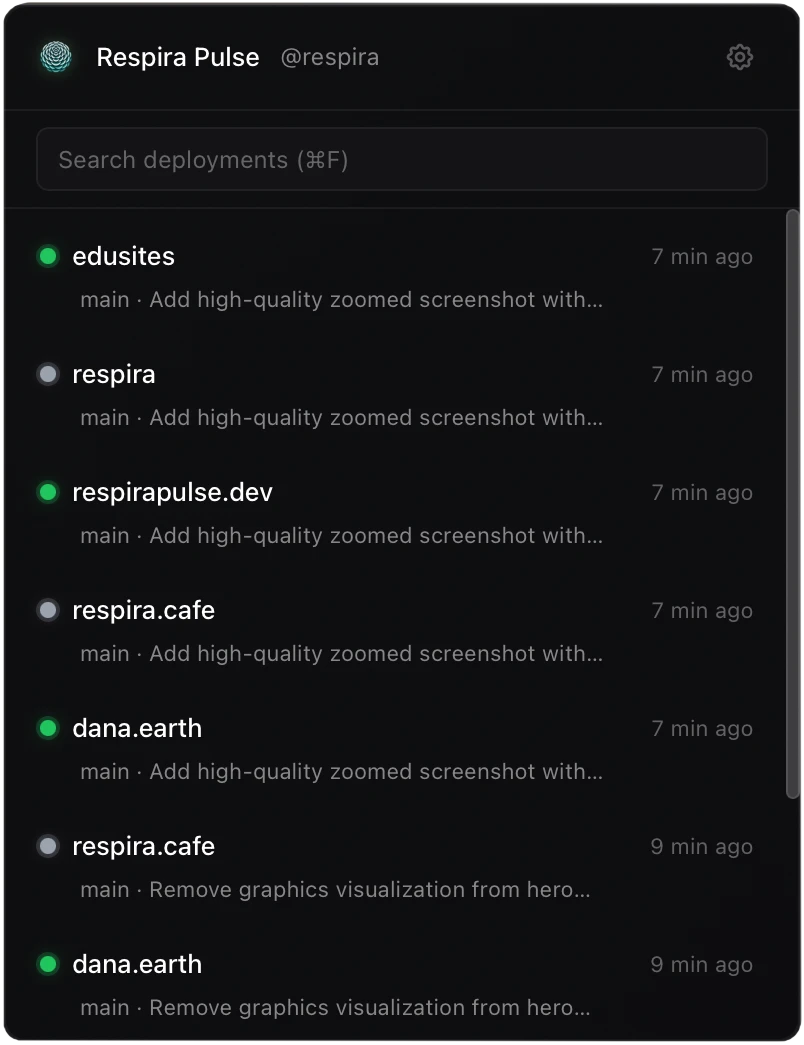
Pulse lives in your menu bar. Glance up, see your status, stay in flow. Green means ready. Yellow means building. That's it.
Who is it for
Developers shipping daily
Stop context-switching. Stay in flow.
Teams managing multiple projects
Monitor all your Vercel deployments at a glance.
Anyone who values quiet tools
Built for focus, not distraction.
Vibe coders
Ambient awareness for the easily distracted.
Quiet when everything's fine. Present when you need it.
One job. Done well.
One-click log copy
Key FeatureBuild failed? Copy the error log instantly. Paste into Claude or ChatGPT.


Menu bar status
One icon. All your projects. Color-coded at a glance.
Green = Ready • Yellow = Building • Red = Failed
Native notifications
Know when deploys finish without checking anything.
Deep Vercel integration
Click any deployment to open it directly in Vercel.
Ambient awareness
The information is there when you need it. Invisible when you don't.
Up and running in 30 seconds
Option A: Direct Download
- 1 Download the DMG for your Mac
- 2 Open the DMG and drag Respira Pulse to Applications
- 3 Right-click the app → Open (first launch only, to bypass Gatekeeper)
- 4 Pulse appears in your menu bar — done
Option B: Homebrew
brew tap webmyc/respira-pulse && brew install --cask respira-pulse Homebrew handles Gatekeeper automatically.

7 days free. Unlimited Vercel projects. No credit card.
One-time payment. No subscriptions. Ever.
Starter
For your side project
1 Vercel project
Unlimited deployments per project
Pro
For the serious shipper
10 Vercel projects
Unlimited deployments per project
Unlimited
For agencies & freelancers
Unlimited Vercel projects
Unlimited deployments per project
✓ One-time payment. Yours forever. No recurring fees.
Growing beyond your tier? Upgrade anytime — we refund your previous purchase automatically.
Fair exchange, not extraction.
Questions

Photo by Kevin Canlas on Unsplash
Why no free tier?
↓
Pulse is built by one person and priced fairly. The 7-day trial gives you full access to decide if it fits your workflow. If it does, a few euros keeps it maintained and improving.
What macOS versions are supported?
↓
macOS 12 (Monterey) and later. Native Apple Silicon and Intel support.
How do I bypass Gatekeeper on first launch?
↓
On first launch, macOS may block the app due to Gatekeeper. This happens because we're an indie developer — apps need Apple's notarization to bypass this, which requires a $99/year Apple Developer license. Once we reach >$99 ARR, we can afford to get notarized (and donate 30% of our income to Apple Inc).
Until then, you have two options:
- Right-click the app → Open (first launch only). This tells macOS you trust the app.
- Or use Terminal to remove the quarantine attribute:
xattr -cr "/Applications/Respira Pulse.app"
After the first launch, you can open it normally. This is a one-time step.
How does the Vercel token work?
↓
You create a personal access token in Vercel (read-only is fine). Pulse uses it to fetch your deployment status. Your token stays on your machine.
Can I switch tiers later?
↓
Yes. Upgrade anytime and we automatically refund your previous purchase. No friction, no support tickets.
For Us, Geeks 🤓
Built with modern tools, native performance, and developer-first principles.

Desktop Runtime
Tauri v2 (Rust) ~5MB bundle size • Native macOS APIs

Frontend
React 19 
TypeScript 
Vite 7 
Tailwind CSS 4 
State Management
Zustand Lightweight & performant
Native Integrations
macOS Keychain
Native notifications
Auto-start on login

APIs
Vercel REST API 
Lemon Squeezy Licensing & payments

Distribution
GitHub Actions 
Homebrew Cask CI/CD • DMG installer
Security First
Your Vercel token lives in macOS Keychain. Secure, native, encrypted.
Homebrew Ready
Install in seconds: brew install --cask respira-pulse
Built with

Claude Code 
Cursor